
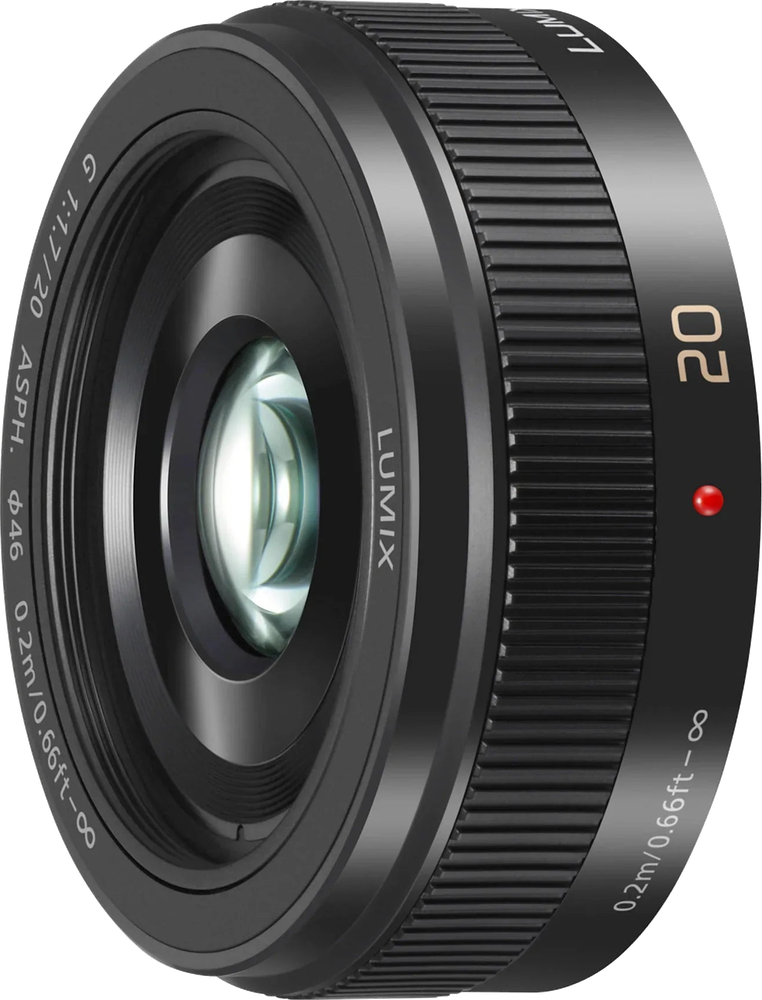
Panasonic LUMIX G Series 20mm f/1.7
Panasonic · 20 mm · f/1.7
Score Breakdown
Scores combine our editorial testing with published lab data.
General | |
|---|---|
About This LensThis is the original Panasonic Lumix G 20mm f/1.7 prime for Micro Four Thirds, introduced in 2009. The later II version followed in 2013. Its short body suits a small everyday camera for streets, travel, people and details. These specifications describe the original version. The f/1.7 maximum aperture gives useful flexibility when light falls. The main trade-off is fixed framing. You cannot widen the view with a zoom ring when another person enters the scene. Choose it when a compact kit and a normal view match the pictures you want. | |
| Brand | Panasonic |
| Release Year | 2009 |
Lens Mount ⓘThe lens mount will tell you what type of lens range you can fit onto the camera body. Often the same camera company will have different lens ranges for different cameras. | Micro Four Thirds |
System ⓘIndicates which camera system the lens is designed to attach to. | Micro Four Thirds |
Maximum Format ⓘLargest sensor size compatible with the lens. | Micro Four Thirds |
Physical64/100 | |
About the BuildThe original lens weighs 3.5 oz (100 g) and measures 1 in (25.5 mm) long and 2.48 in (63 mm) across. It adds little bulk in front of the camera. The body and strap still affect how the complete kit carries. Screw-in filters must match the 46mm front thread to attach directly. | |
| Lens Weight | 100 g |
Lens Diameter ⓘWidth of the lens at its widest point | 63 mm |
Lens Length ⓘHow long the lens is from front to back. | 25.5 mm |
Front Filter Compatible ⓘSome lenses are compatible with front filters, some are compatible with back filters and some are compatible with both. Front filters are usually more convenient to add and remove. |  Yes Yes |
Front Filter Size ⓘDiameter of attachable filters. | 46 mm |
Optics83/100 | |
About the OpticsThe 20mm focal length gives a normal view on Micro Four Thirds. It can show a person with some surroundings or isolate a larger everyday detail. A wider lens can include more of a small room when there is no space to step back. Moving closer makes a subject larger and also changes perspective. Avoid placing the camera very near a face if you want natural-looking proportions. For a street scene, check the edges before taking the picture. A small shift in viewpoint can separate your subject from a distracting sign or pole. The f/1.7 maximum aperture gives more room for a faster shutter speed or lower ISO than a smaller opening. A nearby subject can have a soft background when there is enough space behind it. Stop down when several people or objects at different distances need to stay sharp. Closest focus is 0.7 ft (20 cm), measured from the sensor. Maximum magnification reaches 0.13x, useful for larger details such as a meal or table setting. Leave room ahead of the front glass and avoid shading the subject. Small objects will occupy less of the frame. | |
Focal Range ⓘShortest to longest focal length of the lens (zoom range start - end ) | 20 mm |
Aperture Range ⓘLargest aperture at the lens's shortest focal length to longest focal length (aperture range start - end) | 1.7 |
| Focal Length Angle of View | 57° |
Flange Focal Distance ⓘDistance from lens mount to sensor. | 19.25 mm |
Diaphragm Type ⓘStructure and design of the aperture |  Automatic Automatic |
Blades ⓘNumber of diaphragm blades in aperture | 7020 |
Zoom Lens ⓘZoom allows you to vary the focal length, change between long shots and close-ups | No |
Closest Focusing Distance ⓘMinimum distance for a subject to be in focus. | 20 cm01500 |
Maximum Magnification ⓘLargest size a subject can be reproduced | 0.13x |
| Autofocus Mode |  Yes Yes |
| Manual Mode |  Yes Yes |
| Manual Focusing Ring |  Yes Yes |
Features | |
About the FeaturesThere is no stabilization built into the lens. A camera with body stabilization can help reduce shake for still scenes. Moving people still need enough shutter speed for their movement. A firm support remains useful for a carefully framed night scene or a long exposure. There is no weather sealing, so protect the lens from rain and blowing dust. Keep caps in place when it is off the camera. Let a wet camera bag dry before storing equipment in it, and avoid leaving grit around the lens mount. The front glass lacks a fluorine coating. Remove loose grit before wiping water or oily marks, and keep cleaning pressure light. | |
Weather Sealing ⓘWeather sealing capabilities will give you more confidence when shooting in unfavourable conditions. | No |
Fluorine Coating ⓘCoating to repel water and oil from lens elements. | No |
| Built In Lens Hood | No |
Teleconverter ⓘA teleconverter (extender) is an extra piece of equipment that fits between the lens and the camera body to enhance magnification | No |
| Image Stabilization | No |
Construction15/100 | |
About the ConstructionTwo aspherical elements help correct distortion and spherical aberration, which can bend lines or soften detail. These corrections matter when a picture includes windows, signs and other defined edges. The number of special elements alone does not establish the lens’s measured sharpness. | |
Elements ⓘLens elements refer to individual pieces of glass within the lens. | 7 |
| Groups | 5 |
Aspherical Elements ⓘThe number of aspherical lens elements which can help correct aberrations such as spherical aberration. | 2 |
Bi Aspherical Elements ⓘElements with two non-spherical surfaces | 0 |
Low Dispersion ⓘElements that reduce chromatic aberration | 0 |
Super Low Dispersion ⓘAdvanced elements further reducing chromatic aberration | 0 |
CA Reduction ⓘBuilt-in features to reduce chromatic aberration | 0 |
Internal Focusing ⓘInternal Focusing means that the lens does not change in size during focusing, and the front element does not rotate. | No |