
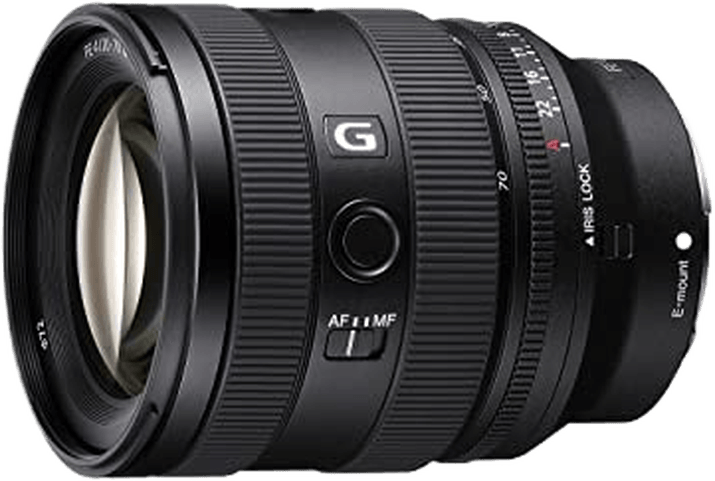
Sony FE 20-70mm f/4 G
Sony · 20–70 mm · f/4 · G
Score Breakdown
Scores combine our editorial testing with published lab data.
General | |
|---|---|
About This LensThis Sony E zoom covers 20–70mm on full-frame cameras. Sony introduced it in 2023. Its wide starting point suits interiors, landscapes and travel scenes where space limits where you can stand. The longer settings also suit people with some surroundings. The f/4 maximum aperture stays available throughout the zoom. The main trade-offs are light gathering and stabilization. There is no stabilization built into the lens, and a wider maximum aperture gives more room for a fast shutter speed in dim light. | |
| Brand | Sony |
| Release Year | 2023 |
Production Status ⓘCurrent status of lens manufacturing (e.g., in production, discontinued). |  In Production In Production |
Pro Branding ⓘSpecific branding codes used for professional-tier lenses. | G |
Lens Mount ⓘThe lens mount will tell you what type of lens range you can fit onto the camera body. Often the same camera company will have different lens ranges for different cameras. | Sony E |
System ⓘIndicates which camera system the lens is designed to attach to. | Sony E |
Maximum Format ⓘLargest sensor size compatible with the lens. |  Full Frame Full Frame |
Physical86/100 | |
About the BuildThe lens weighs 1 lb 1.2 oz (488 g) and measures 3.9 in (99 mm) long and 3.1 in (78.7 mm) across. Consider the camera and lens together when choosing a bag or support. Screw-in filters must match the 72mm front thread to attach directly. | |
| Lens Weight | 488 g |
Lens Diameter ⓘWidth of the lens at its widest point | 78.7 mm |
Lens Length ⓘHow long the lens is from front to back. | 99 mm |
Front Filter Compatible ⓘSome lenses are compatible with front filters, some are compatible with back filters and some are compatible with both. Front filters are usually more convenient to add and remove. |  Yes Yes |
Front Filter Size ⓘDiameter of attachable filters. | 72 mm |
Optics72/100 | |
About the OpticsAt 20mm, you can include more of a room or landscape from one position. At 70mm, one person or detail becomes larger. How much fits still depends on where you stand. Check the frame edges for unwanted objects before taking the photograph. The wide setting can easily include your shadow or equipment. Small changes in camera position can also separate a foreground subject from an object behind it. The maximum aperture remains f/4 as you zoom. You can retain that opening when framing changes, though a different part of the scene may need a different exposure. Sunlight and shade can require different settings even when the aperture stays unchanged. Moving close makes a foreground object look prominent against distant scenery. That change of viewpoint creates the perspective. Nearby subjects can have a soft background at f/4. Stop down and choose focus carefully when details at several distances must stay sharp. Closest focus is 0.8 ft (25 cm) throughout the zoom in manual focus, measured from the sensor. Autofocus reaches that distance at 70mm but needs more space at the wide end. Maximum magnification reaches 0.39x. Leave room ahead of the glass and avoid shading a nearby flower or object. | |
Focal Range ⓘShortest to longest focal length of the lens (zoom range start - end ) | 20–70 mm |
Aperture Range ⓘLargest aperture at the lens's shortest focal length to longest focal length (aperture range start - end) | 4 |
| Focal Length Angle of View | 94.5°–34.35° |
Flange Focal Distance ⓘDistance from lens mount to sensor. | 18 mm |
Diaphragm Type ⓘStructure and design of the aperture |  Automatic Automatic |
Blades ⓘNumber of diaphragm blades in aperture | 9020 |
Zoom Lens ⓘZoom allows you to vary the focal length, change between long shots and close-ups |  Yes Yes |
Zoom Mechanism ⓘSystem enabling zoom function |  Manual Manual |
Zoom Ring ⓘIf zooming is adjusted using a zoom ring |  Yes Yes |
Zoom Type ⓘThe design or approach to zooming |  Rotary Rotary |
Closest Focusing Distance ⓘMinimum distance for a subject to be in focus. | 25 cm01500 |
Maximum Magnification ⓘLargest size a subject can be reproduced | 0.39x |
| Autofocus Mode |  Yes Yes |
| Manual Mode |  Yes Yes |
| Manual Focusing Ring |  Yes Yes |
Features52/100 | |
About the FeaturesThere is no stabilization in the lens. A camera with body stabilization can reduce shake for still scenes. A tripod gives a firm base for long exposures and controlled video work. A moving person still needs enough shutter speed for their movement. Dust and moisture resistance help outdoors. Use cover in persistent rain. Fluorine coating helps water and oily marks wipe away from the front glass. Remove loose grit before cleaning, especially after working near sand or soil. The rotary zoom ring changes framing manually. There is no zoom lock switch. Keep the lens supported when carrying the camera between locations. | |
Weather Sealing ⓘWeather sealing capabilities will give you more confidence when shooting in unfavourable conditions. |  Yes Yes |
Fluorine Coating ⓘCoating to repel water and oil from lens elements. |  Yes Yes |
| Built In Lens Hood | No |
| Lens Hood Type |  Petal Petal |
Zoom Lock ⓘZoom lock allows the zoom ring to be locked at the desired focal length | No |
Teleconverter ⓘA teleconverter (extender) is an extra piece of equipment that fits between the lens and the camera body to enhance magnification | No |
| Image Stabilization | No |
Construction31/100 | |
About the ConstructionFour aspherical elements help correct distortion and spherical aberration, which can bend lines or soften detail. One also uses ED glass. That element and three further ED elements help reduce coloured fringes along high-contrast edges, such as a roof against bright sky. | |
Elements ⓘLens elements refer to individual pieces of glass within the lens. | 16 |
| Groups | 13 |
Aspherical Elements ⓘThe number of aspherical lens elements which can help correct aberrations such as spherical aberration. | 4 |
Bi Aspherical Elements ⓘElements with two non-spherical surfaces | 0 |
Low Dispersion ⓘElements that reduce chromatic aberration | 4 |
Super Low Dispersion ⓘAdvanced elements further reducing chromatic aberration | 0 |
CA Reduction ⓘBuilt-in features to reduce chromatic aberration | 0 |
Internal Focusing ⓘInternal Focusing means that the lens does not change in size during focusing, and the front element does not rotate. | No |