
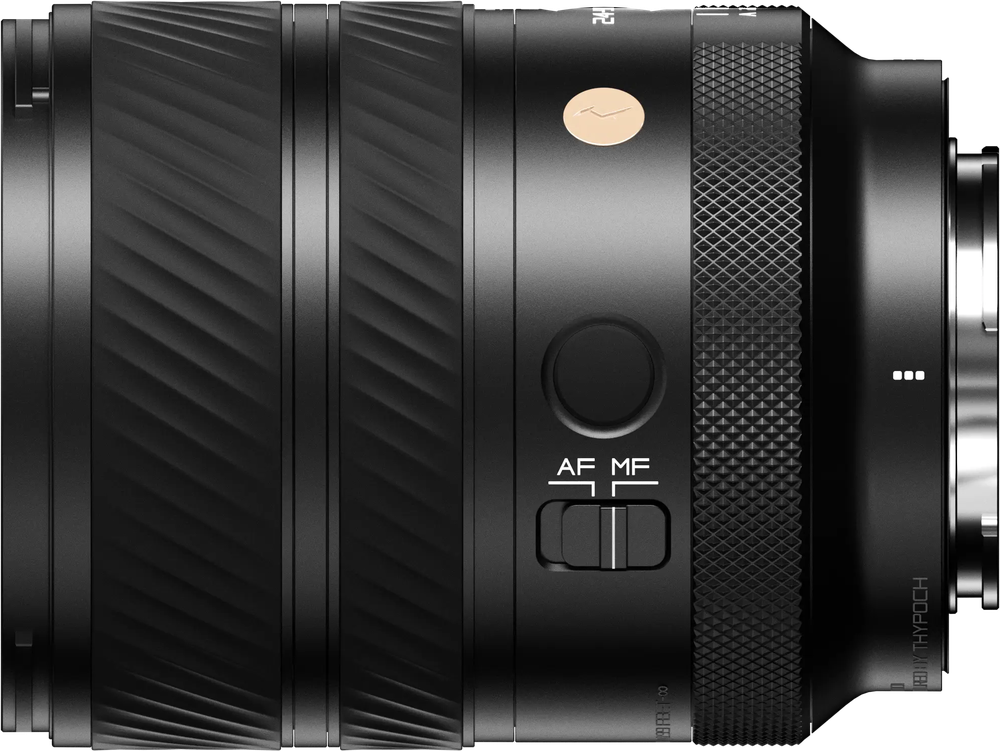
Thypoch Voyager 24-50mm f/2.8 AF
Thypoch · 24–50 mm · f/2.8 · Voyager
Score Breakdown
Scores combine our editorial testing with published lab data.
General | |
|---|---|
About This LensThe Thypoch Voyager 24–50mm f/2.8 is a full-frame zoom for Sony E cameras. It suits street scenes, travel, events and everyday portraits. The wide end includes more surroundings, while 50mm gives a tighter view from the same position. How much fits depends on the subject size and your distance. Introduced in 2026, it combines a constant f/2.8 maximum aperture with a compact body. The zoom stops at 50mm, so consider a longer lens when distant subjects are a regular part of your work. Internal zoom keeps the barrel length fixed as you change focal length. | |
| Brand | Thypoch |
| Release Year | 2026 |
Production Status ⓘCurrent status of lens manufacturing (e.g., in production, discontinued). |  In Production In Production |
Pro Branding ⓘSpecific branding codes used for professional-tier lenses. | Voyager |
Lens Mount ⓘThe lens mount will tell you what type of lens range you can fit onto the camera body. Often the same camera company will have different lens ranges for different cameras. | Sony E |
System ⓘIndicates which camera system the lens is designed to attach to. | Sony E |
Maximum Format ⓘLargest sensor size compatible with the lens. |  Full Frame Full Frame |
Physical64/100 | |
About the BuildThe Sony E lens weighs 15.2 oz (432 g) and measures 3.65 in (92.8 mm) long and 2.9 in (73.6 mm) across. Its compact body is useful in an everyday kit or a travel bag. A screw-in filter attached directly must match the 67mm thread. Allow room for the hood or an attached filter when packing. | |
| Lens Weight | 432 g |
Lens Diameter ⓘWidth of the lens at its widest point | 73.6 mm |
Lens Length ⓘHow long the lens is from front to back. | 92.8 mm |
Front Filter Compatible ⓘSome lenses are compatible with front filters, some are compatible with back filters and some are compatible with both. Front filters are usually more convenient to add and remove. |  Yes Yes |
Front Filter Size ⓘDiameter of attachable filters. | 67 mm |
Optics83/100 | |
About the OpticsAt 24mm, this lens gives a wide view on full frame. It can help with interiors, groups and street scenes, although available space affects what fits. At 50mm, you can select a person or detail within the scene. Zooming changes framing from one position; moving also changes perspective. The f/2.8 maximum stays available right across the zoom, at 24mm just as at 50mm. That helps in dim restaurants, churches and evening streets, where you keep the widest opening instead of losing light as you zoom. At 50mm, f/2.8 can also soften the background behind a portrait subject. The range stops before telephoto focal lengths. A small or distant subject may occupy less of the frame than you want. Check the view from your planned position before an event, especially if a seat or barrier prevents movement. A longer lens may be useful for details farther away. Closest focus is 1 ft (30 cm), measured from the sensor. Maximum magnification is 0.22x. That range can help with food, flowers and tabletop objects. Leave space ahead of the lens for light, and check that the camera does not shade the subject as you move closer. | |
Focal Range ⓘShortest to longest focal length of the lens (zoom range start - end ) | 24–50 mm |
Aperture Range ⓘLargest aperture at the lens's shortest focal length to longest focal length (aperture range start - end) | 2.8 |
| Focal Length Angle of View | 83°–47° |
Flange Focal Distance ⓘDistance from lens mount to sensor. | 18 mm |
Diaphragm Type ⓘStructure and design of the aperture |  Automatic Automatic |
Blades ⓘNumber of diaphragm blades in aperture | 10020 |
Zoom Lens ⓘZoom allows you to vary the focal length, change between long shots and close-ups |  Yes Yes |
Zoom Mechanism ⓘSystem enabling zoom function |  Manual Manual |
Zoom Ring ⓘIf zooming is adjusted using a zoom ring |  Yes Yes |
Zoom Type ⓘThe design or approach to zooming |  Rotary Rotary |
Closest Focusing Distance ⓘMinimum distance for a subject to be in focus. | 30 cm01500 |
Maximum Magnification ⓘLargest size a subject can be reproduced | 0.22x |
| Autofocus Mode |  Yes Yes |
| Manual Mode |  Yes Yes |
| Manual Focusing Ring |  Yes Yes |
Features32/100 | |
About the FeaturesDust and moisture resistance help during outdoor work. Use cover in persistent rain, and keep the mount clean when changing lenses. Remove loose grit before wiping the front glass, especially after working beside sand or soil. Put both caps on before storing the lens. There is no stabilisation in the lens. A camera with body stabilisation can help with shake. Firm support is useful for slow exposures of still subjects, but a moving person still needs an appropriate shutter speed. The wide aperture helps with exposure; it does not steady the camera. | |
Weather Sealing ⓘWeather sealing capabilities will give you more confidence when shooting in unfavourable conditions. |  Yes Yes |
Fluorine Coating ⓘCoating to repel water and oil from lens elements. | No |
| Built In Lens Hood | No |
| Lens Hood Type |  Petal Petal |
Zoom Lock ⓘZoom lock allows the zoom ring to be locked at the desired focal length | No |
Teleconverter ⓘA teleconverter (extender) is an extra piece of equipment that fits between the lens and the camera body to enhance magnification | No |
| Image Stabilization | No |
Construction54/100 | |
About the ConstructionThe optical formula uses 16 elements in 13 groups. Aspherical surfaces help correct spherical aberration and distortion, which can make straight building edges appear curved. Low-dispersion glass helps reduce chromatic aberration, the coloured fringes that can appear along high-contrast edges such as a window against a dark interior. Internal zoom and internal focusing keep the outer length fixed. This is useful when arranging a camera on a support. The equipment must still be balanced and secured for its intended use. | |
Elements ⓘLens elements refer to individual pieces of glass within the lens. | 16 |
| Groups | 13 |
Aspherical Elements ⓘThe number of aspherical lens elements which can help correct aberrations such as spherical aberration. | 2 |
Bi Aspherical Elements ⓘElements with two non-spherical surfaces | 0 |
Low Dispersion ⓘElements that reduce chromatic aberration | 3 |
Super Low Dispersion ⓘAdvanced elements further reducing chromatic aberration | 0 |
CA Reduction ⓘBuilt-in features to reduce chromatic aberration | 0 |
Internal Focusing ⓘInternal Focusing means that the lens does not change in size during focusing, and the front element does not rotate. |  Yes Yes |